
Tool calling
Agents do more than chat—they take action. Xiajiao (虾饺) ships seven built-in tools, ready to use. Together with Agent persistent memory, RAG, and integrations, the stack is complete.

The Agent calls memory_search for context and memory_write to persist insights—fully visible in the UI.
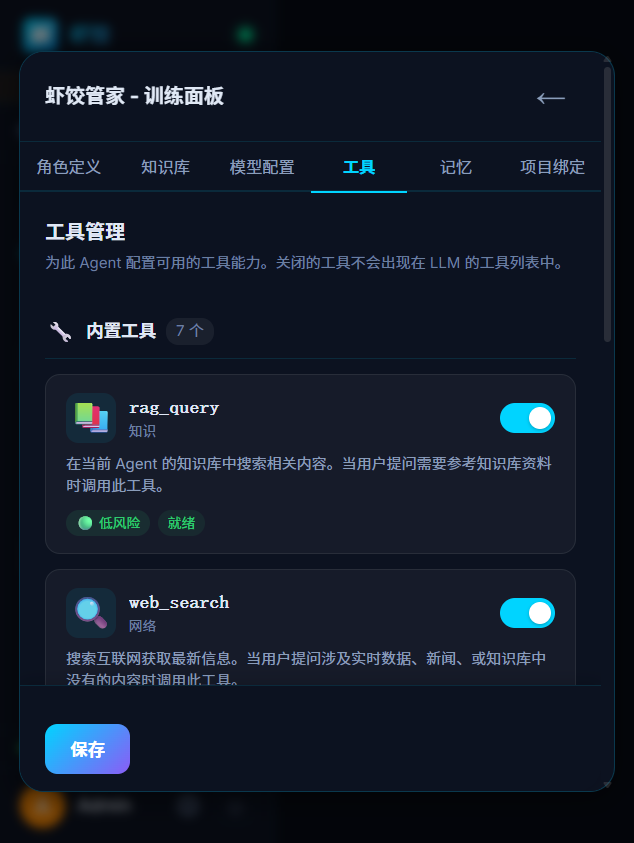
Tool panel — configure tools per Agent with one-click toggles
How it works
Tool calling implements a full LLM loop. The Agent does not reply once and stop—it thinks → acts → observes → thinks again:
┌──────────────────────────────────────────────────────┐
│                                                      │
│  User message                                        │
│     ↓                                                │
│  LLM: need a tool?                                   │
│     │                                                │
│     ├─ no → reply directly → user                     │
│     │                                                │
│     └─ yes → tool call request                        │
│              ↓                                       │
│           Run tool(s) (maybe several)                 │
│              ↓                                       │
│           Feed results back into context              │
│              ↓                                       │
│           LLM again (may call more tools)             │
│              ↓                                       │
│           Final reply                                │
│                                                      │
└──────────────────────────────────────────────────────┘
Fully transparent
You always see which tool runs, arguments, and results in the chat UI—not a black box.
The seven built-in tools
1. web_search — web search
Search the internet for up-to-date information.
| Property | Description |
|---|---|
| Engines | 6 |
| List | auto / DuckDuckGo / Brave / Kimi / Perplexity / Grok |
| Mode | auto picks an available engine |
| Failover | Try the next engine if one fails |
Example
You: @Code assistant What is new in Node.js 22?
Code assistant: [web_search: "Node.js 22 new features"] → summarizes results
2. rag_query — knowledge base
Retrieve from documents you uploaded.
| Property | Description |
|---|---|
| Retrieval | BM25 + vector hybrid |
| Ranking | RRF fusion + LLM rerank |
| Chunking | ~200 chars / ~800 chars |
Example
You: @Code assistant How do we authenticate API calls?
Code assistant: [rag_query: "API authentication"] → answers from your docs
See RAG.
3. memory_write — write persistent memory
The Agent stores important facts in long-term memory.
| Property | Description |
|---|---|
| Types | semantic / episodic / procedural |
| Storage | embeddings + SQLite |
| Dedup | embedding similarity to avoid duplicates |
Example
You: I am a backend dev, mostly Python, company uses AWS
Code assistant: [memory_write: type="semantic", content="User is backend, Python, AWS"]
→ remembered for later sessions
4. memory_search — search memory
Query an Agent’s persistent memory.
Example
You: What was that deployment plan you looked up for me?
Code assistant: [memory_search: "deployment plan"] → recalls and answers5. call_agent — call another Agent
One Agent delegates a subtask to another.
| Property | Description |
|---|---|
| Nesting guard | Max 3 levels (A→B→C ok; A→B→C→D blocked) |
| Invocation | Target Agent ID + message |
| Return | Full reply from the callee |
Example
You: @Code assistant Write an English README for me
Code assistant: Sure — I'll draft in Chinese first, then call the Translator to translate.
  [call_agent: agent="translator", message="Please translate the following README to English: ..."]
Translator: [returns English translation]
Code assistant: Here is the full English README: ...
Nesting limit
The 3-level cap prevents infinite ping-pong (A calls B, B calls A, …).
6. manage_channel — channel management
Manage external connectors so Agents can reach Feishu (Lark), DingTalk, and more. See Integrations for capabilities and setup.
| Action | Description |
|---|---|
| Create connector | Platform type and credentials |
| Start | Begin listening for inbound messages |
| Stop | Pause listening |
Supported platforms: Feishu (Lark) / DingTalk / WeCom / Telegram
7. manage_schedule — scheduled jobs
Run tasks on a Cron schedule.
| Property | Description |
|---|---|
| Syntax | Standard Cron |
| Example | 0 9 * * 1 = every Monday 09:00 |
| Ops | create / delete / list jobs |
Example
You: @Xiajiao Butler Every day at 9:00 send me a news digest
Butler: [manage_schedule: cron="0 9 * * *", task="news digest"]
→ Runs daily at 9:00 — searches for news and sends a digest.
Tool permissions
Each Agent has its own allowlist:
{
  "id": "coder",
  "name": "Code assistant",
  "tools": {
    "allow": ["web_search", "memory_write", "memory_search", "rag_query"]
  }
}
Best practices
- Xiajiao Butler: allow all tools (system administration)
- Creative Agents (novelist/editor): memory only—avoid search noise
- Technical Agents (code): web_search + rag_query + memory
- Translators: web_search (terms) + memory
Compared to other platforms
| Xiajiao (虾饺) | Dify | Coze | |
|---|---|---|---|
| Built-in tools | 7 | 10+ | 100+ plugins |
| Custom tools | HTTP tools (zero-code) + JS auto-register + MCP | Code nodes | Plugin dev |
| Visibility | Live tool trace | Yes | Partial |
| Cross-Agent | call_agent | No | No |
| Per-Agent ACL | Yes | Yes | Yes |
| Extensibility | Three methods, no restart for HTTP tools | API + config | Plugin development |
Xiajiao (虾饺) has fewer plugins than Coze but emphasizes cross-Agent calls, fully visible tool traces, and zero-code HTTP tool extension.
What it looks like in the UI
Real Tool Calling output in the web app:
You: @Code assistant Latest Bun vs Node.js benchmarks

Code assistant: Searching for the latest comparison.

  Calling web_search...
  ├── query: "Bun vs Node.js performance benchmark 2026"
  ├── engine: Google
  └── Found 8 results

From recent benchmarks (March 2026):

| Metric | Node.js 22 | Bun 1.x |
|--------|------------|---------|
| HTTP req/s | ~45,000 | ~78,000 |
| Cold start | ~50ms | ~8ms |
| RAM (Hello World) | ~40MB | ~20MB |
| npm install | 1x | ~3x

Note: workload-dependent. For long-running services, Node.js ...

  Writing memory...
  └── Saved: "User cares about Bun vs Node.js performance"
Each tool call appears in real time in the chat UI, so you can clearly see the Agent's thinking process.
Custom tools
Xiajiao offers three ways to extend tools beyond the seven built-ins:
Method 1: HTTP custom tools (zero-code)
Configure any HTTP API as an Agent tool — no code, just fill a form in Settings → HTTP Tools.
| Property | Description |
|---|---|
| URL | Endpoint with |
| Method | GET / POST / PUT / DELETE |
| Headers | Custom headers (e.g. Authorization) |
| Body | JSON template with |
| Response extract | Dot-path expression to pick a result field (e.g. fields.summary) |
Example — JIRA ticket lookup:
{
  "name": "jira_get_issue",
  "description": "Look up a JIRA issue by key",
  "url": "https://your-domain.atlassian.net/rest/api/3/issue/{{issueKey}}",
  "method": "GET",
  "headers": { "Authorization": "Basic {{token}}" },
  "parameters": [
    { "name": "issueKey", "type": "string", "description": "e.g. PROJ-123", "required": true },
    { "name": "token", "type": "string", "description": "Base64 credentials" }
  ],
  "responseExtract": "fields.summary"
}
Configure once, enable on any Agent — the LLM calls it like a built-in tool.
Method 2: JS auto-register (drop a file)
Drop a .js file into server/services/tools/ (built-in) or data/custom-tools/ (user-defined). The tool registry scans both directories on startup and registers each module automatically.
// data/custom-tools/my_tool.js
export default {
  description: "Query internal company systems",
  parameters: {
    type: "object",
    properties: {
      system: { type: "string", enum: ["crm", "erp", "jira"] },
      query: { type: "string", description: "Search query" }
    },
    required: ["system", "query"]
  },
  handler: async ({ system, query }) => {
    const result = await internalAPI.query(system, query);
    return { data: result };
  }
};
File name becomes tool name: my_tool.js → tool my_tool. Restart to pick up new files.
Method 3: MCP bridged tools
Connect to external MCP servers (stdio or HTTP) and their tools automatically appear as mcp:{serverId}:{toolName}.
Configure MCP servers in Settings → MCP; Xiajiao discovers tools via JSON-RPC capability negotiation and registers them.
Which method to choose?
- HTTP tools: fastest — zero code, configure in UI, great for REST APIs
- JS auto-register: most flexible — full Node.js power, async logic, custom auth
- MCP bridged: for complex external services that already offer MCP servers
Related docs
- Agent persistent memory —
memory_write/memory_search - RAG —
rag_querypipeline - Integrations — Feishu / DingTalk / WeCom / Telegram
- Collaboration flow — automatic handoffs without manual @mention
- Security & privacy — data and API keys
- Platform comparison — Xiajiao (虾饺) vs Dify vs Coze vs FastGPT
- Architecture — Tool Calling loop in code
- Model configuration — models that support tools