
Channel integrations
Xiajiao (虾饺) is not only a standalone web app—it can connect Agents to the platforms you work in every day.
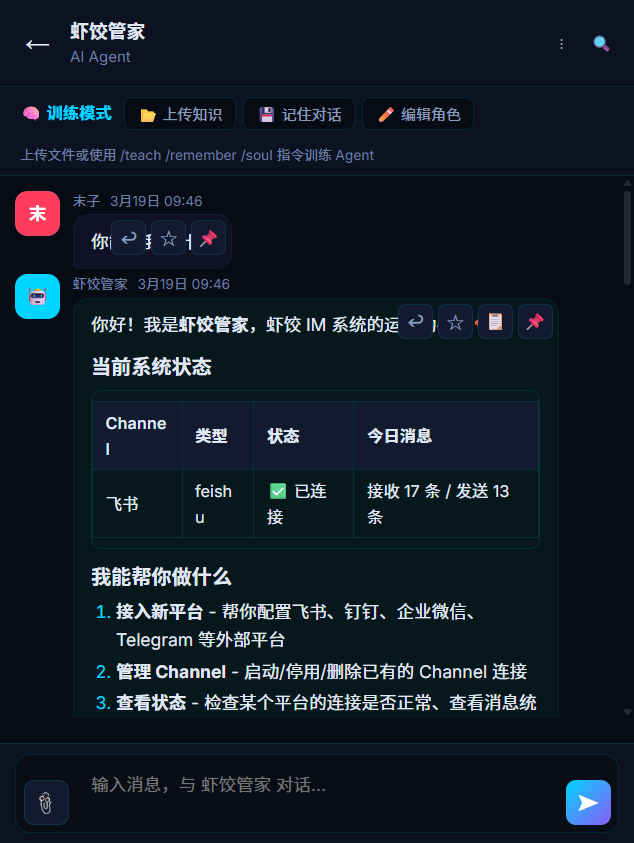
Manage channels in chat with the Butler Agent—`manage_channel` runs automatically.
Architecture
Feishu / DingTalk / WeCom / Telegram
       ↕ Webhook / WebSocket
  ┌────────────────┐
  │  Xiajiao (虾饺) IM   │
  │                │
  │  Route → Agent → LLM │
  │                │
  │  Persist SQLite      │
  └────────────────┘
Inbound messages are normal chat messages: route to the Agent, call the LLM, return replies to the external channel. SOUL.md, memory, RAG, and Tool Calling all apply.
Supported channels
| Channel | Protocol | Status | Notes |
|---|---|---|---|
| Feishu (Lark) | WebSocket | Supported | Long-lived connection, no public IP required |
| DingTalk | Webhook | In development | Needs public callback URL |
| WeCom | Webhook | In development | Needs public callback URL |
| Telegram | Bot API | In development | Needs public URL or proxy |
| Slack | Bot API | Planned | — |
| Discord | Bot API | Planned | — |
Feishu (detailed)
Feishu is the most mature integration: WebSocket, no public IP.
Step 1: Create a Feishu app
- Open Feishu Open Platform
- Create a custom enterprise app
- Copy
App IDandApp Secret
Step 2: Scopes
Under Permission management, enable:
| Scope | Purpose |
|---|---|
im:message | Read/send messages |
im:message:send_as_bot | Send as the bot |
im:chat | Read group info |
contact:user.id:readonly | Resolve user IDs |
Step 3: Event subscription
- Enable long connection for events
- Subscribe to
im.message.receive_v1
Step 4: Configure in Xiajiao (虾饺)
Add a Feishu connector in settings:
{
  "type": "feishu",
  "appId": "cli_xxxxxxxx",
  "appSecret": "xxxxxxxxxxxxxxxxxxxxxxxx",
  "agentId": "agent_xxx"
}| Field | Meaning |
|---|---|
appId | Feishu app ID |
appSecret | Feishu app secret |
agentId | Xiajiao Agent that receives messages |
Step 5: Test
- Find your app in Feishu
- Message the bot
- Replies should appear in Feishu
Feishu notes
- WebSocket: SDK maintains the connection with auto-reconnect—no public URL setup
- Formatting: Markdown is converted to Feishu rich text
- Groups: Bot can join groups; @mention triggers it
- Mapping: One Feishu app maps to one Xiajiao Agent
DingTalk (preview)
In development
DingTalk is under active development; configuration may change.
Create a bot
- DingTalk Open Platform — create an app
- Enable the bot capability
- Set the message callback URL (public IP)
Config
{
  "type": "dingtalk",
  "appKey": "dingxxxxxxxx",
  "appSecret": "xxxxxxxxxxxxxxxxxxxxxxxx",
  "agentId": "agent_xxx",
  "callbackUrl": "https://your-domain.com/webhook/dingtalk"
}
Public URL
| Approach | When |
|---|---|
| Cloud VPS + Nginx | Production |
| ngrok / frp | Local testing |
| Cloudflare Tunnel | Free tunnel |
WeCom (preview)
In development
WeCom integration is in development.
Create a WeCom app
- WeCom admin — create an app
- Set receive message URL
- Collect
CorpID,AgentId,Secret
Config
{
  "type": "wecom",
  "corpId": "wxxxxxxxxx",
  "agentId": "1000002",
  "secret": "xxxxxxxxxxxxxxxxxxxxxxxx",
  "token": "your-token",
  "encodingAESKey": "xxxxxxxxxxxxxxxxxxxxxxxx",
  "xiajiaoAgentId": "agent_xxx"
}
Telegram (preview)
In development
Telegram bot support is in development.
Create a bot
- Open Telegram, find
@BotFather /newbotand follow prompts- Save the bot token
Config
{
  "type": "telegram",
  "botToken": "123456:ABC-DEF...",
  "agentId": "agent_xxx"
}
Network
Telegram may be unreachable from mainland China without:
- Hosting Xiajiao (虾饺) outside the region, or
HTTP_PROXY(or equivalent) for outbound calls
Custom channel adapters
If you need another platform, you can build a channel adapter yourself.
Adapter interface
Each channel adapter must implement two core methods:
class MyChannelAdapter {
  async onMessage(externalMessage) {
    const message = this.convertToXiajiaoMessage(externalMessage);
    await this.forwardToAgent(message);
  }

  async sendMessage(xiajiaoMessage) {
    const formatted = this.convertToExternalFormat(xiajiaoMessage);
    await this.externalAPI.send(formatted);
  }
}
Format mapping
| Internal | Feishu | DingTalk | WeCom | Telegram |
|---|---|---|---|---|
| Plain text | text | text | text | text |
| Markdown | post | markdown | markdown | MarkdownV2 |
| Image | image | image | image | photo |
| File | file | file | file | document |
| Code block | post (code) | markdown | markdown | pre |
Code layout
server/services/connectors/
├── feishu-ws.js       # Feishu WebSocket long connection
├── webhook.js         # Generic webhook (DingTalk / WeCom)
├── websocket.js       # Generic WebSocket
├── polling.js         # Polling-based
└── _template.js.example  # Template for new connectors
Multi-channel, one Agent
One Agent can serve web + Feishu + DingTalk simultaneously. Memory is shared: a question in Feishu is remembered when the same user continues on the web (subject to your identity mapping).
Feishu: "What is our deploy process?"
  → Answer + memory_write("user asked about deploy")

Web: "Expand step 3 of the deploy flow"
  → memory_search → continues with context
FAQ
Feishu bot receives nothing
im.message.receive_v1subscribed- Long connection mode enabled
- App published (draft apps may not receive)
- Check server logs for WebSocket errors
Multiple channels per Agent?
Yes. Same Agent can serve web + Feishu + DingTalk; memory is shared across channels when identities align.
Does web break when channels are on?
No. Channels are additive.
Tool Calling on external channels?
Platforms may not show intermediate tool traces. The Agent usually sends the final reply after tools finish. Use the web UI for full tool visibility on the same thread when needed.
Related docs
- Tool Calling —
manage_channel - Quick start
- Cloud deployment — service must be reachable
- Security & privacy — token handling
- Troubleshooting