
Quick start
Three steps—about 30 seconds—to run your AI agent team.
Requirements
- Node.js >= 22.0.0 (download)
Why Node.js 22?
Xiajiao uses the built-in node:sqlite module in Node.js 22, so you do not install a separate database. That is how it keeps zero external dependencies.
Step 1: Clone the repo
git clone https://github.com/moziio/xiajiao.git
cd xiajiao
Step 2: Install dependencies
npm installOnly six packages—usually five to ten seconds.
What are the six dependencies?
| Package | Role | Why keep it |
|---|---|---|
ws | WebSocket server | Node has no WS server in stdlib |
formidable | Multipart uploads | Boundary splitting and streaming for multipart/form-data not in stdlib |
node-cron | Cron scheduling | Cron expressions (e.g. 0 9 * * 1 → Monday 9:00) not in stdlib |
pdf-parse | PDF text | RAG knowledge base needs PDF text |
@larksuiteoapi/node-sdk | Feishu connector | Feishu’s long-lived WebSocket protocol needs the official SDK |
@modelcontextprotocol/sdk | MCP | JSON-RPC + capability negotiation; DIY is fragile |
Step 3: Start
npm startSuccess looks like:
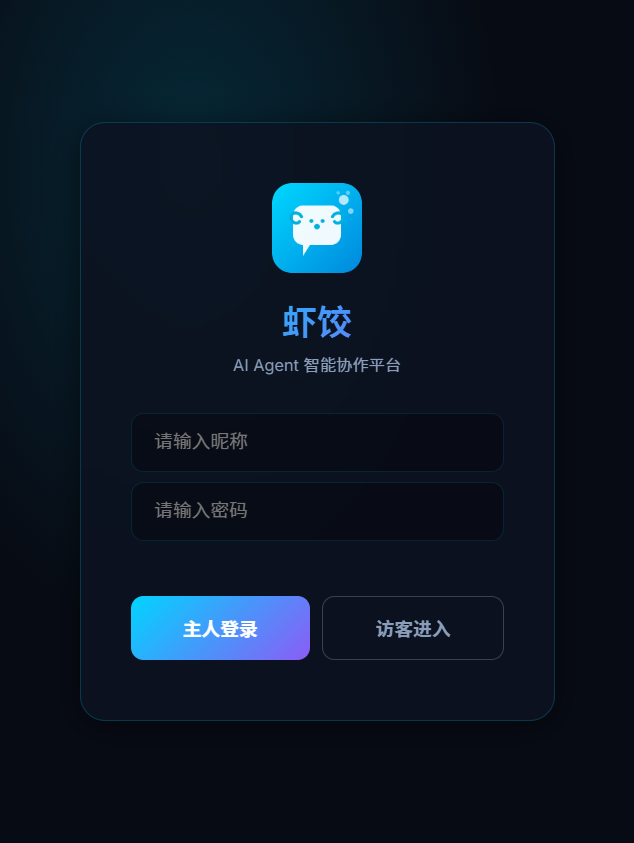
Server running on http://localhost:18800Open http://localhost:18800 in a browser—you should see the login screen:
Step 4: Configure the LLM
Base URLs, model names, and troubleshooting: Model configuration.
- Log in with the default password
admin - Go to Settings → Model management
- Add your LLM API key
Supported providers
Xiajiao supports any OpenAI-compatible API. Common providers:
| Provider | API base URL | API type | Cost (rough) |
|---|---|---|---|
| OpenAI | https://api.openai.com/v1 | openai-completions | $5–60 / M tokens |
| Anthropic | https://api.anthropic.com | anthropic-messages | $3–75 / M tokens |
| Qwen (DashScope) | https://dashscope.aliyuncs.com/compatible-mode/v1 | openai-completions | CN¥0.3–60 / M tokens |
| DeepSeek | https://api.deepseek.com | openai-completions | CN¥1–16 / M tokens |
| Kimi (Moonshot) | https://api.moonshot.cn/v1 | openai-completions | CN¥12 / M tokens |
| GLM (Zhipu) | https://open.bigmodel.cn/api/paas/v4 | openai-completions | CN¥1–100 / M tokens |
| Ollama | http://localhost:11434/v1 | openai-completions | Free (local) |
| OpenRouter | https://openrouter.ai/api/v1 | openai-completions | Per model |
Saving money
- Free: Ollama locally (Llama 3, Qwen 2, …—plan for 8GB+ VRAM)
- Very cheap: DeepSeek / Qwen—small spend goes far
- Best quality: Claude Opus / GPT-4o for serious writing and coding
Ollama locally
To avoid API bills, use Ollama for open models:
ollama pull llama3.1      # download model
ollama pull qwen2.5       # or Qwen
In Xiajiao set API base URL to http://localhost:11434/v1; API key can be empty.
Configuration walkthrough
- Click Add configuration
- Provider name—any label (e.g. “Qwen”)
- API base URL—from the table above
- API key—from the vendor console
- Default model—e.g.
qwen-turbo,gpt-4o - Save
Then assign provider + model per agent:
Settings → Agents → Coding assistant → Model: pick "Qwen / qwen-plus"Mix models
Different agents can use different models, for example:
- Coding assistant → Claude
- Translator → GPT-4o
- Casual chat → Qwen (cheap)
Step 5: Start chatting
After models are configured:
One-to-one
Click any agent in the left contact list:
| Agent | Good for |
|---|---|
| 🤖 Xiajiao steward | “Set a daily 9:00 cron job” |
| ✍️ Novelist | “Write a poem about spring” |
| 📝 Editor | “Polish this copy” |
| 🌐 Translator | “Translate this to English” |
| 💻 Coding assistant | “Write a Python crawler” |
Group collaboration
- In contacts, click New group
- Add several agents
- Use
@AgentNameto target one agent
You: @Novelist write a poem about moonlight
Novelist: [reply in your language...]

You: @Translator translate that poem to English
Translator: The moonlight gently graces my windowsill...
Collaboration chains
In group settings, define a chain for automatic handoff:
Novelist → Editor → TranslatorOne message from you can run all three in order.
Sanity checks
You are good if:
- [x]
http://localhost:18800loads - [x] Password login works
- [x] Settings save LLM config
- [x] Agents reply in chat
- [x] Tool calls appear in the reply (when tools are enabled)
Common issues
Port in use
Error: listen EADDRINUSE :::18800Use another port:
IM_PORT=3000 npm startWrong Node.js version
node -v
# upgrade if below v22.0.0
See Installation.
Change the password?
Set an environment variable at startup:
OWNER_KEY=your-strong-password npm startHTTPS?
Xiajiao serves HTTP only. For production, put Nginx (or similar) in front with TLS. See Cloud deployment.
Agent not replying?
- Check LLM config (API key / base URL)
- Check the browser console for errors
- Confirm the agent has a model assigned
Recommended first-hour path
After installation, follow this order to explore Xiajiao's core features:
Five minutes (basics)
- Open Coding assistant, send a message
- Watch streaming output
- Paste code and ask for a review
Fifteen minutes (multi-agent)
- Create a group: novelist + editor + translator
- Set chain: novelist → editor → translator
- Send one prompt and watch the handoff
- Watch the visual panel state
Thirty minutes (custom agents)
- Create a new agent from contacts
- Edit its SOUL.md (see templates)
- Attach tools and a model
- Chat and tune SOUL.md
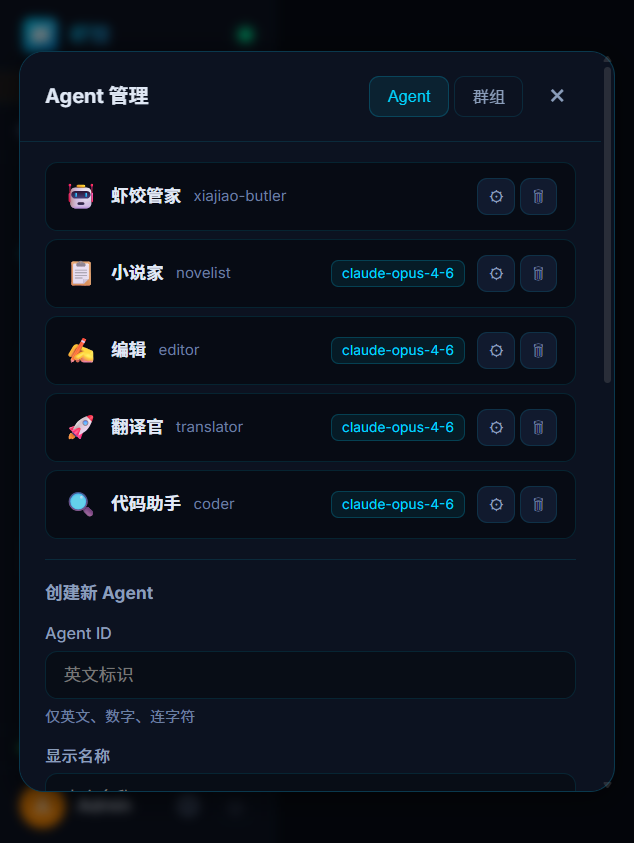
Agent management—manage the list; use the form below to create agents
One hour (team setup)
- Upload docs to the RAG knowledge base
- Add cron jobs (e.g. daily news digest)
- Try setups from Recipes
Next steps
| You want… | Read this |
|---|---|
| Detailed install | Installation — Windows / macOS / Linux |
| Group chat | Multi-agent chat — groups and @mentions |
| More models | Model configuration — eight providers |
| Docker | Docker deployment |
| Personas | SOUL.md guide |
| Copy setups | Recipes — 12 team configs |
| Problems | Troubleshooting |
Related docs
- Model configuration — provider URLs, model IDs, checklists
- SOUL.md guide — roles and skills
- Recipes — twelve copy-paste team configs