
Agent persistent memory
Xiajiao (虾饺) implements a three-way persistent memory system so Agents get to know you over time.
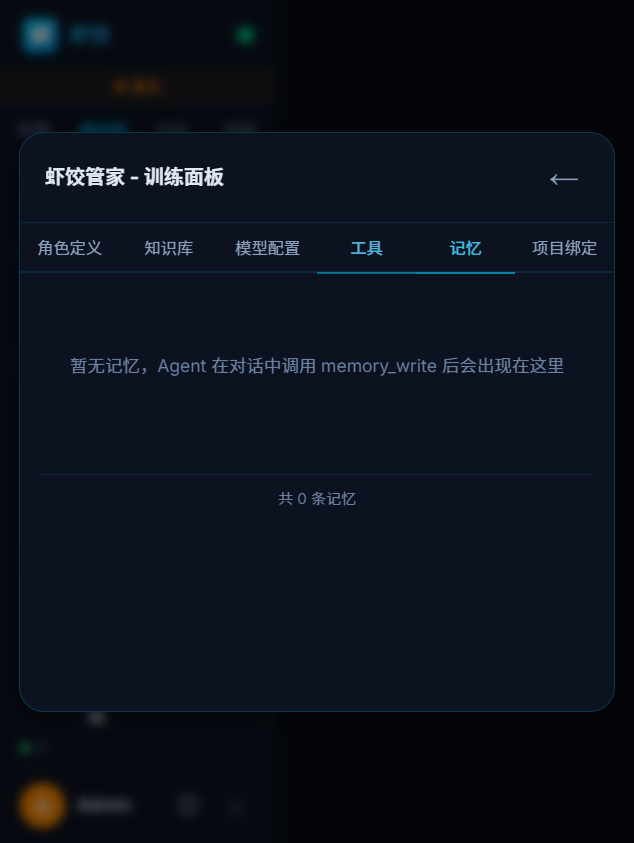
Memory panel — inspect and manage an Agent’s memories
This is one of the biggest differences from typical chat UIs: conversations are not disposable. Agents remember across threads. Writes and reads go through Tool Calling via memory_write / memory_search.
Why persistent memory?
Most chat UIs start cold every time. Preferences, project context, and rules you set—gone next session.
| Without memory | With persistent memory |
|---|---|
| Repeat your stack every time | “You use Python on AWS—I remember.” |
| Forgets prior threads | “Last time you wanted Docker deploy.” |
| Repeats mistakes | “You asked for concise replies.” |
| One-size style | Personalized to you |
Three memory types
Inspired by cognitive science’s long-term memory split:
1. Semantic memory
Facts and knowledge—objective information about you and the project.
| Example | Use |
|---|---|
| “User prefers Python” | Prefer Python in answers |
| “Company uses Alibaba Cloud” | Factor into cloud advice |
| “Project uses PostgreSQL” | SQL examples use PG |
| “Team uses Git Flow” | Branching suggestions follow it |
2. Episodic memory
Events and episodes—what happened in past conversations.
| Example | Use |
|---|---|
| “We discussed Docker deploy last time” | Continue that thread |
| “User mentioned WeChat integration” | Track open requests |
| “We debugged login last Friday” | Continuous collaboration feel |
| “User disliked last translation” | Adjust next time |
3. Procedural memory
Patterns and preferences—how you want the Agent to behave.
| Example | Use |
|---|---|
| “Keep replies short” | Tone and length |
| “Code samples in TypeScript” | Example language |
| “No emoji in output” | Formatting |
| “Confirm requirements before code” | Workflow |
Technical architecture
End-to-end flow
┌──────────────────────────────────────────────────────────────┐
│                                                              │
│  Write                              Read                     │
│                                                              │
│  During chat                        New message              │
│     ↓                                    ↓                   │
│  memory_write                         Embed user text         │
│     ↓                                    ↓                   │
│  Text → embedding                    Cosine search memory   │
│     ↓                                    ↓                   │
│  Dedup by similarity                  Top-K memories        │
│  ├── sim > 0.85 → update existing        ↓                   │
│  └── sim ≤ 0.85 → insert new          Inject into system    │
│     ↓                                    ↓                   │
│  Store in SQLite                     Agent replies with it   │
│                                                              │
└──────────────────────────────────────────────────────────────┘
Storage design
| Piece | Tech | Notes |
|---|---|---|
| DB | SQLite | One DB file per Agent |
| Vectors | Embeddings in SQLite | No external vector DB |
| Embed model | Same provider as Agent LLM | Default text-embedding-3-small |
| Similarity | Cosine | Pure JS |
| Dedup threshold | 0.85 | Above = same memory, update |
Dedup example
New: "User likes Python"
Existing: "User prefers Python language"
→ cosine = 0.95 > 0.85
→ update existing row

New: "User wants to learn Docker today"
Existing: "User prefers Python language"
→ cosine = 0.3 < 0.85
→ insert new row
Auto-inject memory
With autoInjectMemory: true, each turn:
- User sends a message
- Embed the text
- Cosine-search the Agent’s memory DB
- Take Top-K (default 10)
- Format by the three types
- Inject into the
[MEMORY]section of the system prompt
Example system prompt snippet
# Code assistant

You are a full-stack engineer...

## [MEMORY]
What you remember about this user:

### Semantic
- User prefers Python; company on AWS
- Project uses PostgreSQL

### Episodic
- Last time: Docker deploy with docker-compose

### Procedural
- Replies should be concise; code samples prefer Python
Performance
Auto-inject usually adds ~200–500 tokens—fine for most models. With many memories, only Top-K is used.
Manual memory tools
Without auto-inject, Agents can still use tools:
memory_write
Agent: [memory_write]
args: {
  "type": "semantic",
  "content": "User is backend, mostly Python"
}
memory_search
Agent: [memory_search]
args: {
  "query": "user tech stack"
}
returns: [
  { type: "semantic", content: "User prefers Python; AWS", similarity: 0.87 },
  { type: "semantic", content: "Project uses PostgreSQL", similarity: 0.72 }
]
Isolation
Each Agent has its own memory—no cross-talk:
Code assistant: Python prefs, concise replies
Translator: EN↔ZH needs, literary tone
Novelist: Tang-Song style, seven-character lines
Different “rapport” per Agent.
Compared to others
| Xiajiao (虾饺) | ChatGPT Memory | Claude Projects | |
|---|---|---|---|
| Taxonomy | 3 types | Flat list | Project knowledge |
| Persistence | Local SQLite | Cloud | Cloud |
| Embed dedup | Yes | No | No |
| Auto inject | Configurable | Yes | Yes |
| Multi-Agent isolation | Per Agent | Global | Global |
| Data locality | Local | Cloud | Cloud |
Best practices
1. Seed memories early
You: I am a Python backend dev at a fintech. Stack FastAPI + PostgreSQL on AWS.
     Prefer Python samples and keep answers short.
The Agent will memory_write these preferences.
2. Use procedural memory for behavior
You: Never use var in samples—only const and let.
→ saved as procedural; future code follows it
3. Review periodically
You: List everything you remember about me
→ memory_search and show; you can correct
4. Guide memory in SOUL.md
## Memory rules
- Stack, prefs, work context → memory_write(semantic)
- Important decisions → memory_write(episodic)
- Repeated output prefs → memory_write(procedural)
- Skip ephemeral small talk
Full example
First session
You: Python backend at a finance firm. FastAPI + PostgreSQL on AWS.

Code assistant: Noted—I’ll remember your stack.

  Writing memory...
  ├── [semantic] Python backend, finance
  ├── [semantic] FastAPI + PostgreSQL on AWS
  └── Saved 2 entries

I’ll default to Python + FastAPI and SQLAlchemy for DB code...
A week later
You: Write a user registration endpoint

Code assistant:
  Retrieving memories...
  ├── [semantic] Python backend, finance (0.82)
  ├── [semantic] FastAPI + PostgreSQL (0.91)
  └── Injected into context

Here is a FastAPI + SQLAlchemy registration route:
(no “which framework?” round-trip)
Without memory, you’d get a generic “Flask or Django or FastAPI?” question.
Inspect and manage via SQLite
View via command line
# List all memories for an Agent
sqlite3 data/workspace-{agentId}/memory.db \
  "SELECT type, content, created_at FROM memories ORDER BY created_at DESC;"

# Count by type
sqlite3 data/workspace-{agentId}/memory.db \
  "SELECT type, COUNT(*) AS c FROM memories GROUP BY type;"

# Search memories containing a keyword
sqlite3 data/workspace-{agentId}/memory.db \
  "SELECT type, content FROM memories WHERE content LIKE '%Python%';"
Delete incorrect memories
# Remove an inaccurate memory row
sqlite3 data/workspace-{agentId}/memory.db \
  "DELETE FROM memories WHERE content LIKE '%stale fact%';"
Export backup
# Back up the memory database
cp data/workspace-{agentId}/memory.db memory-backup-$(date +%Y%m%d).db
Related docs
- Tool Calling —
memory_write/memory_searchand ACLs - RAG — document-level retrieval
- Multi-agent group chat — collaboration
- SOUL.md guide — memory behavior in SOUL.md
- Templates — 20 persona templates
- Security & privacy
- Recipes — interview coach, study buddy, etc.