
本地运行
最简单的方式。适合个人使用和开发调试。
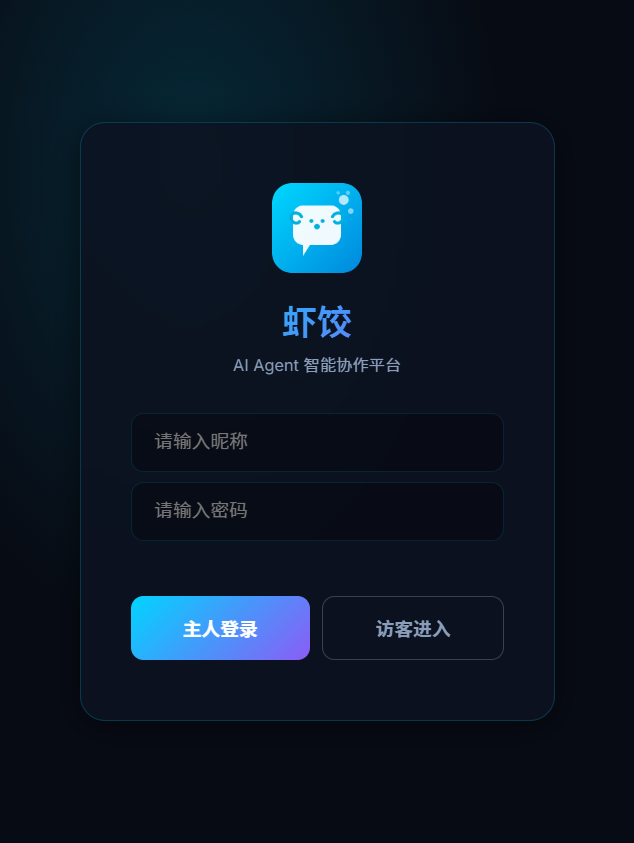
部署成功后访问 http://localhost:18800 即可看到登录界面。
快速启动(3 行命令)
git clone https://github.com/moziio/xiajiao.git
cd xiajiao && npm install
npm start
浏览器打开 http://localhost:18800,默认管理员密码 admin。
安装速度
6 个 npm 依赖,npm install 通常 5-10 秒完成。不会出现"装了 5 分钟还在跑"的情况。
环境变量
| 变量 | 说明 | 默认值 | 是否必须 |
|---|---|---|---|
IM_PORT | 服务监听端口 | 18800 | 否 |
OWNER_KEY | 管理员密码(登录用) | admin | 生产环境必须修改 |
LLM_MODE | LLM 模式 | direct | 否 |
设置方式
Linux / macOS:
IM_PORT=3000 OWNER_KEY=my-secret npm startWindows CMD:
set IM_PORT=3000
set OWNER_KEY=my-secret
node server/index.js
Windows PowerShell:
$env:IM_PORT = "3000"
$env:OWNER_KEY = "my-secret"
node server/index.js
修改默认密码
默认密码是 admin,仅适用于本地开发。如果你在局域网或公网运行,务必修改 OWNER_KEY。
首次登录与配置
1. 登录
打开 http://localhost:18800,输入管理员密码(默认 admin)。
2. 配置 LLM
登录后第一件事——配置 AI 模型。进入"设置"页面:
设置 → LLM 配置填写你的 LLM Provider 信息:
| Provider | API Base URL 示例 | 说明 |
|---|---|---|
| OpenAI | https://api.openai.com/v1 | 需要 API Key |
| Anthropic | https://api.anthropic.com | 需要 API Key |
| 通义千问 | https://dashscope.aliyuncs.com/compatible-mode/v1 | 阿里云 API Key |
| Ollama | http://localhost:11434/v1 | 本地运行,无需 Key |
| OpenRouter | https://openrouter.ai/api/v1 | 聚合平台 |
Ollama 本地运行
如果你不想付费,可以用 Ollama 在本地运行开源模型(Llama 3、Qwen 2 等)。安装 Ollama 后,API Base URL 填 http://localhost:11434/v1,无需 API Key。
3. 开始聊天
配置完成后,点击通讯录中的任意 Agent(比如"代码助手"),发送第一条消息。
后台运行
开发完成后想长期运行?有几种方式:
方式 1:nohup(最简单)
nohup npm start > xiajiao.log 2>&1 &
echo $!  # 记下 PID,方便后续停止
停止:
kill <PID>方式 2:PM2(推荐)
PM2 是 Node.js 专业的进程管理器,支持自动重启、日志管理、开机自启。
npm install -g pm2

# 启动
pm2 start server/index.js --name xiajiao

# 设置开机自启
pm2 save
pm2 startup

# 常用命令
pm2 status          # 查看状态
pm2 logs xiajiao    # 查看日志
pm2 restart xiajiao # 重启
pm2 stop xiajiao    # 停止
方式 3:systemd(Linux 服务)
创建 /etc/systemd/system/xiajiao.service:
[Unit]
Description=Xiajiao IM
After=network.target

[Service]
Type=simple
User=your-user
WorkingDirectory=/path/to/xiajiao
ExecStart=/usr/bin/node server/index.js
Restart=on-failure
RestartSec=5
Environment=OWNER_KEY=your-secret

[Install]
WantedBy=multi-user.targetsudo systemctl daemon-reload
sudo systemctl enable xiajiao
sudo systemctl start xiajiao
sudo systemctl status xiajiao方式 4:Windows 批处理
创建 start-xiajiao.bat:
@echo off
title Xiajiao IM
cd /d "C:\path\to\xiajiao"
set OWNER_KEY=your-secret
node server/index.js
pause
双击运行,或放入"启动"文件夹实现开机自启。
数据目录结构
虾饺的所有数据存储在项目目录的 data/ 和 public/uploads/ 中:
xiajiao/
├── data/
│   ├── xiajiao.db              # 主数据库(消息、频道、Agent 配置)
│   ├── agents.json         # Agent 列表
│   ├── workspace-xxx/      # Agent 工作区
│   │   ├── SOUL.md         # Agent 人格设定
│   │   ├── memory.db       # Agent 独立记忆库
│   │   └── rag/            # RAG 知识库文件
│   └── _soul-templates/    # SOUL.md 模板
├── public/uploads/         # 用户上传文件(图片等)
└── ...
数据备份
备份以下两个目录即可完整恢复:
# 备份
tar czf xiajiao-backup-$(date +%Y%m%d).tar.gz data/ public/uploads/

# 恢复
tar xzf xiajiao-backup-20260319.tar.gz
自动备份
可以用 cron 每天自动备份:
# 每天凌晨 3 点备份到 /backups/
0 3 * * * cd /opt/xiajiao && tar czf /backups/xiajiao-$(date +\%Y\%m\%d).tar.gz data/ public/uploads/
常见问题
端口被占用
Error: listen EADDRINUSE :::18800换个端口:IM_PORT=3000 npm start
Node.js 版本太低
SyntaxError: Unexpected token虾饺需要 Node.js 22+。检查版本:node -v
数据库锁定错误
SQLITE_BUSY: database is locked确保没有其他进程在访问同一个 data/xiajiao.db 文件。
Windows 上 npm install 失败
如果遇到原生模块编译错误,安装 Visual Studio Build Tools:
npm install --global windows-build-tools或者使用预编译的二进制包(通常自动下载)。
如何让局域网内其他设备访问?
虾饺默认监听 0.0.0.0:18800,局域网内其他设备直接访问 http://你的IP:18800 即可。
# 查看本机 IP
# Linux/macOS
ip addr | grep "inet "
# Windows
ipconfig
确保防火墙允许 18800 端口入站。
Windows 如何设置开机自启?
方法 1:任务计划程序
- 打开"任务计划程序"
- 创建基本任务 → 触发器选"计算机启动时"
- 操作选"启动程序"
- 程序:
node,参数:server/index.js,起始目录:虾饺安装路径
方法 2:放入启动文件夹
把 start-xiajiao.bat 的快捷方式放到:
C:\Users\你的用户名\AppData\Roaming\Microsoft\Windows\Start Menu\Programs\StartupmacOS 后台运行
使用 launchd,创建 ~/Library/LaunchAgents/com.xiajiao.plist:
<?xml version="1.0" encoding="UTF-8"?>
<!DOCTYPE plist PUBLIC "-//Apple//DTD PLIST 1.0//EN" "http://www.apple.com/DTDs/PropertyList-1.0.dtd">
<plist version="1.0">
<dict>
  <key>Label</key>
  <string>com.xiajiao</string>
  <key>ProgramArguments</key>
  <array>
    <string>/usr/local/bin/node</string>
    <string>/path/to/xiajiao/server/index.js</string>
  </array>
  <key>RunAtLoad</key>
  <true/>
  <key>KeepAlive</key>
  <true/>
  <key>WorkingDirectory</key>
  <string>/path/to/xiajiao</string>
  <key>EnvironmentVariables</key>
  <dict>
    <key>OWNER_KEY</key>
    <string>your-secret</string>
  </dict>
</dict>
</plist>launchctl load ~/Library/LaunchAgents/com.xiajiao.plist升级虾饺
cd xiajiao
git pull                # 拉取最新代码
npm install             # 更新依赖(如有变化)
# 重启服务(根据你的运行方式)
pm2 restart xiajiao     # PM2
sudo systemctl restart xiajiao   # systemd
data/ 目录不受 git pull 影响,升级不会丢失任何数据。